How to Buy and Sell Crypto
Modified on Tue, 23 Jun at 2:25 PM
Exchange between crypto and your fiat accounts instantly — buy crypto using your USD, EUR or GBP account, or sell crypto back to fiat, all within Wirex One.
How it works
Buy and Sell are a form of exchange where one side is always fixed:
- Buy — you spend from your USD, EUR or GBP account to purchase a crypto asset. The crypto account is fixed; you choose which account to spend from.
- Sell — you sell a crypto asset back to your USD, EUR or GBP account. The crypto account is fixed; the account with the highest balance is pre-selected.
The rate is always displayed as: Crypto asset : Account currency
Examples: 1 BTC : 70,000 USD · 1 WPAY : 0.15 EUR
USD-based stablecoins are bought and sold using your USD account. EUR-based stablecoins use your EUR account.How to buy crypto
Tap Buy from the Markets list or from an asset in your Portfolio.
The To account (crypto) is fixed — pre-filled from the asset you tapped.
Select the From account — you can switch between your USD and EUR accounts. The account with the highest balance is pre-selected.
Enter the amount.
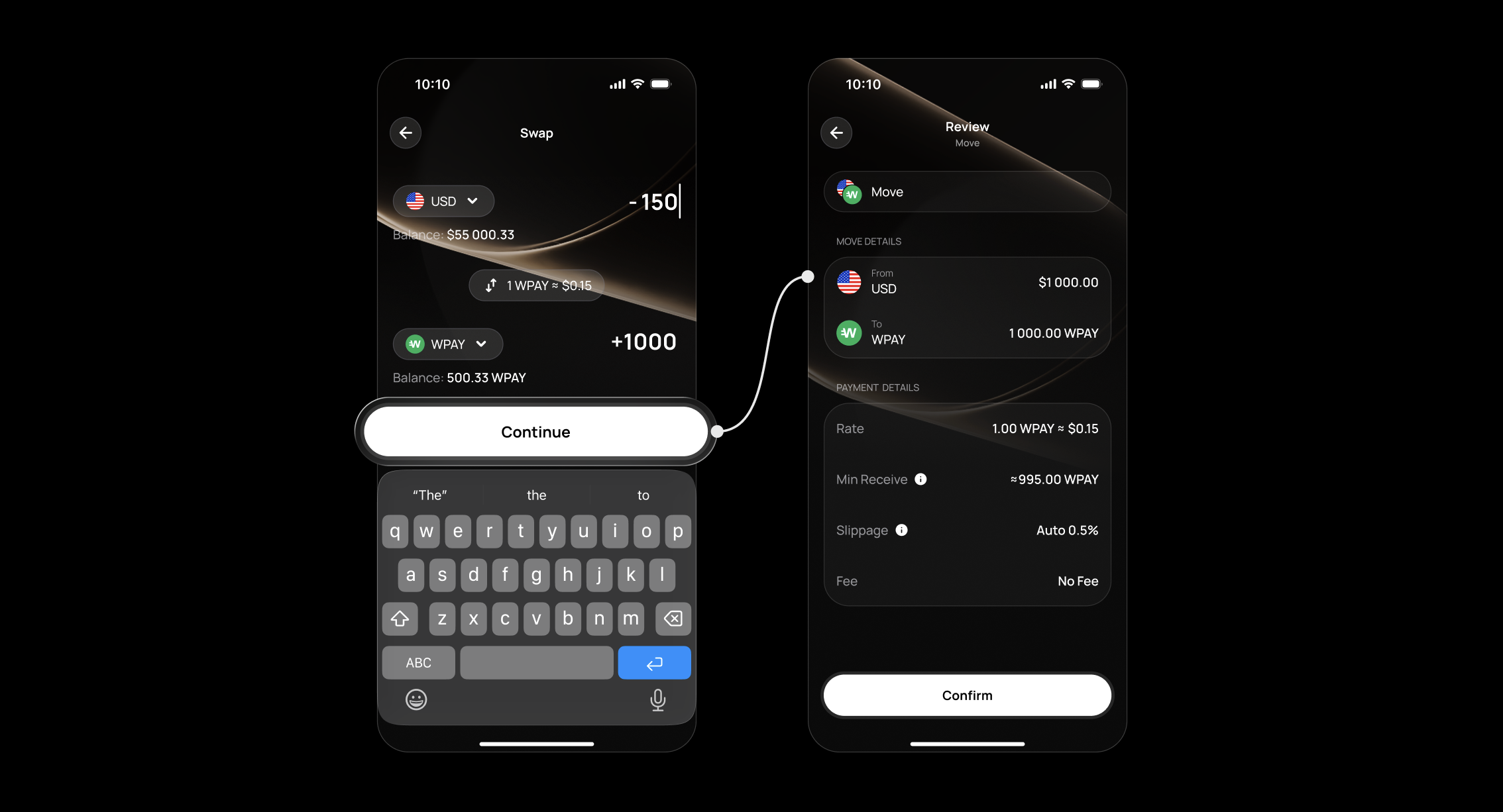
Tap Continue — the system calculates the rate, Min Receive, Slippage, and fee in real time.
Review the full breakdown on the Review screen.
Tap Confirm and sign your transaction.
The transaction appears in your Activity immediately.
How to sell crypto
Tap Sell from an asset in your Portfolio or the Markets list.
The From account (crypto) is fixed — pre-filled from the asset you tapped.
The To account — you can switch between your USD and EUR accounts. The account with the highest balance is pre-selected.
Enter the amount.
Tap Continue — the system calculates the rate, Min Receive, Slippage, and fee in real time.
Review the full breakdown on the Review screen.
Tap Confirm and sign your transaction.
Key terms
- Min Receive — the minimum amount you're guaranteed to receive, even if the rate shifts slightly before your exchange is completed.
- Slippage — the maximum rate change Wirex One will allow before executing your exchange. If the rate moves beyond this threshold, the transaction will not be processed.
Tracking your exchange
For complete visibility, tap the transaction in your Activity and select More to view the full status timeline — updating automatically at every stage, so you're always in control.
FAQ
Which accounts can I use to buy crypto?
Can I switch the account when buying?
Is there a fee?
What happens if my transaction expires?
Can I cancel a Buy or Sell once confirmed?
Still have questions?
Our support team is here to helpWas this article helpful?
That’s Great!
Thank you for your feedback
Sorry! We couldn't be helpful
Thank you for your feedback
Feedback sent
We appreciate your effort and will try to fix the article