How to receive crypto
Modified on Tue, 23 Jun at 2:19 PM
Deposit any supported cryptocurrency directly to your Wirex One wallet — instantly and without verification.
Note: If you want to top up your stablecoin balance, simply fund the corresponding account — the stablecoin balance reflects your account balance at a 1:1 rate:- USD account → USD-based stablecoins (USDC, USDT)
- EUR account → EUR-based stablecoins (EURC)
No conversion fee. No spread. No verification required.
All other supported crypto assets are credited directly to your crypto wallet.
How to receive crypto
Tap Receive on the Investment tab or from a specific asset in your Portfolio.
Select the token you want to receive. The network list filters automatically to show only compatible networks.
Select the network.
Your wallet address is displayed, along with a Memo or Destination Tag if required by the network.
Tap Share to copy or send your deposit details — including the QR code — in the format: Network, Token, Address, Memo/Tag.
Send from your external wallet or exchange.
Once confirmed on-chain, your balance updates automatically and the transaction appears in Activity.
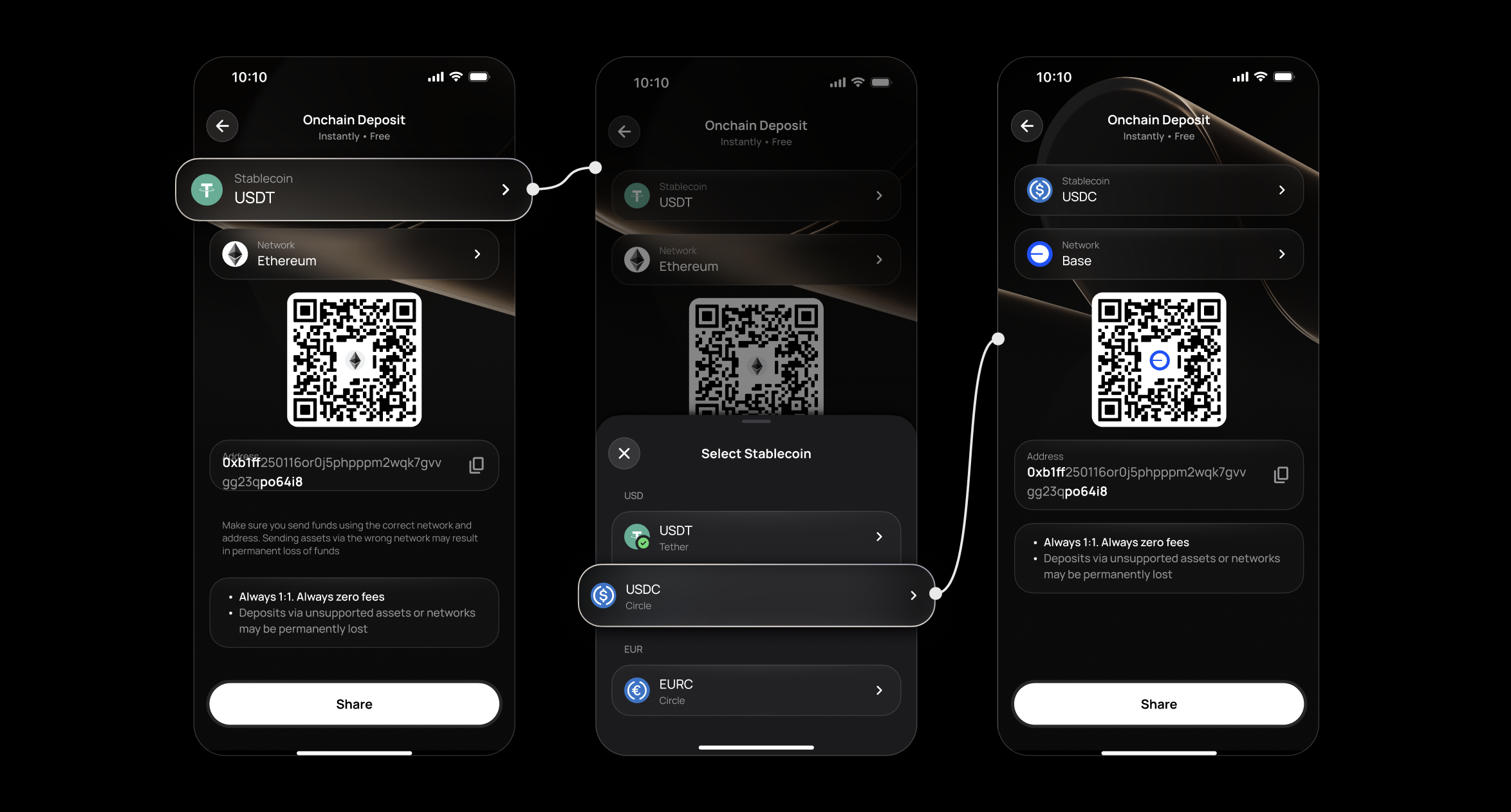
Important: Always verify the token and network before sending. Wirex One cannot recover funds sent to the wrong address or network.Tracking your deposit
Track your deposit status in real time directly in your Activity — tap the transaction and select More to see the full status timeline.
As soon as a deposit is initiated, it appears with an amber status. Each stage updates automatically until the funds are credited. If a deposit is rejected at any stage, the timeline shows precisely where and why.
FAQ
Do I need to verify my account to receive crypto?
Which tokens are supported?
What is a Memo or Destination Tag?
What if I send the wrong token or use the wrong network?
How long does a crypto deposit take?
Can I top up my stablecoin balance?
Yes — fund the corresponding account. The stablecoin balance reflects your account balance at a 1:1 rate:
- USD account → USD-based stablecoins (USDC, USDT)
- EUR account → EUR-based stablecoins (EURC)
No conversion fee. No spread. No verification required. Go to Home → Add → Onchain Deposit.
My deposit is confirmed on-chain but hasn't appeared — what do I do?
Related articles
Still have questions?
Our support team is here to helpWas this article helpful?
That’s Great!
Thank you for your feedback
Sorry! We couldn't be helpful
Thank you for your feedback
Feedback sent
We appreciate your effort and will try to fix the article